All,
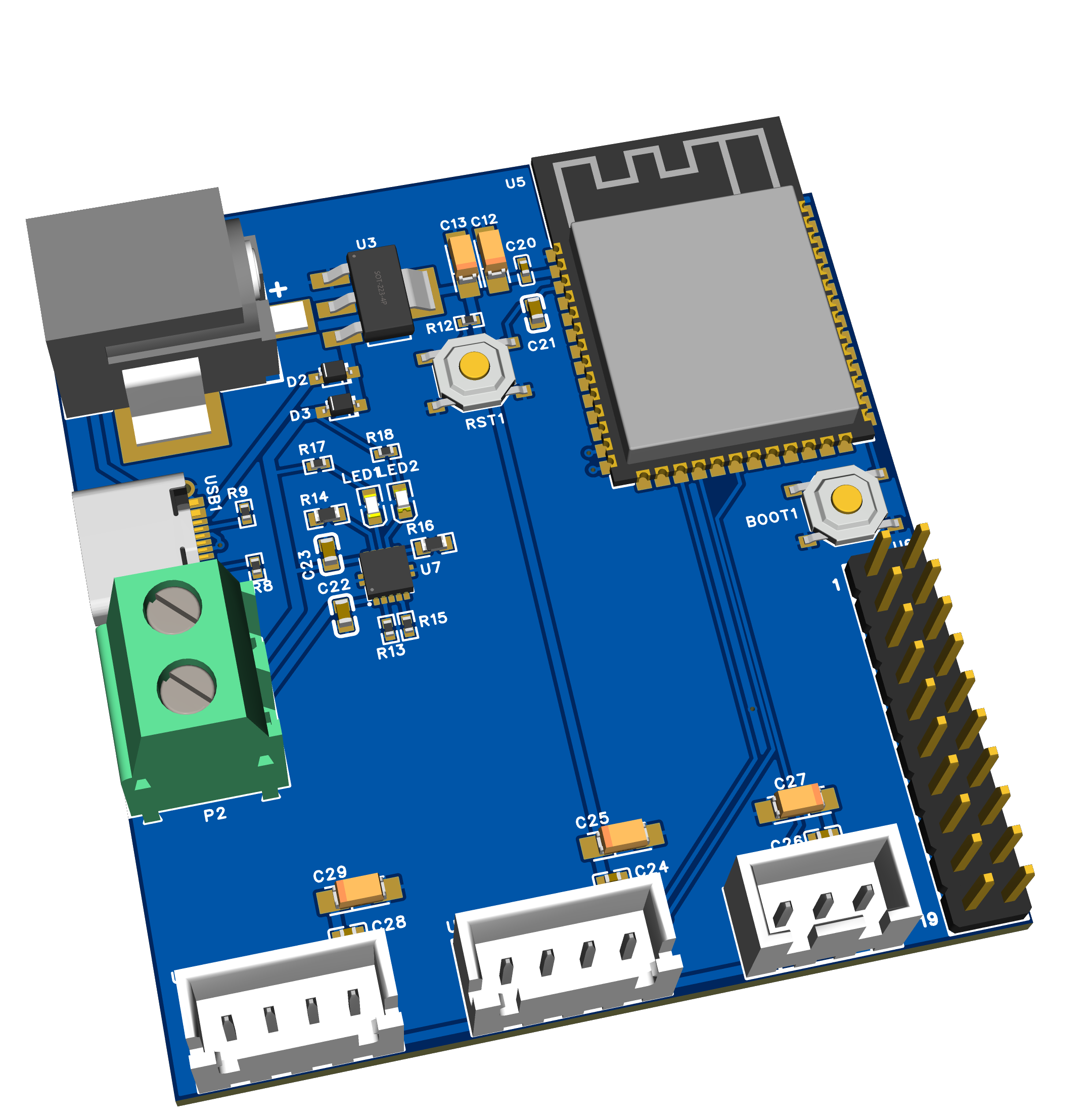
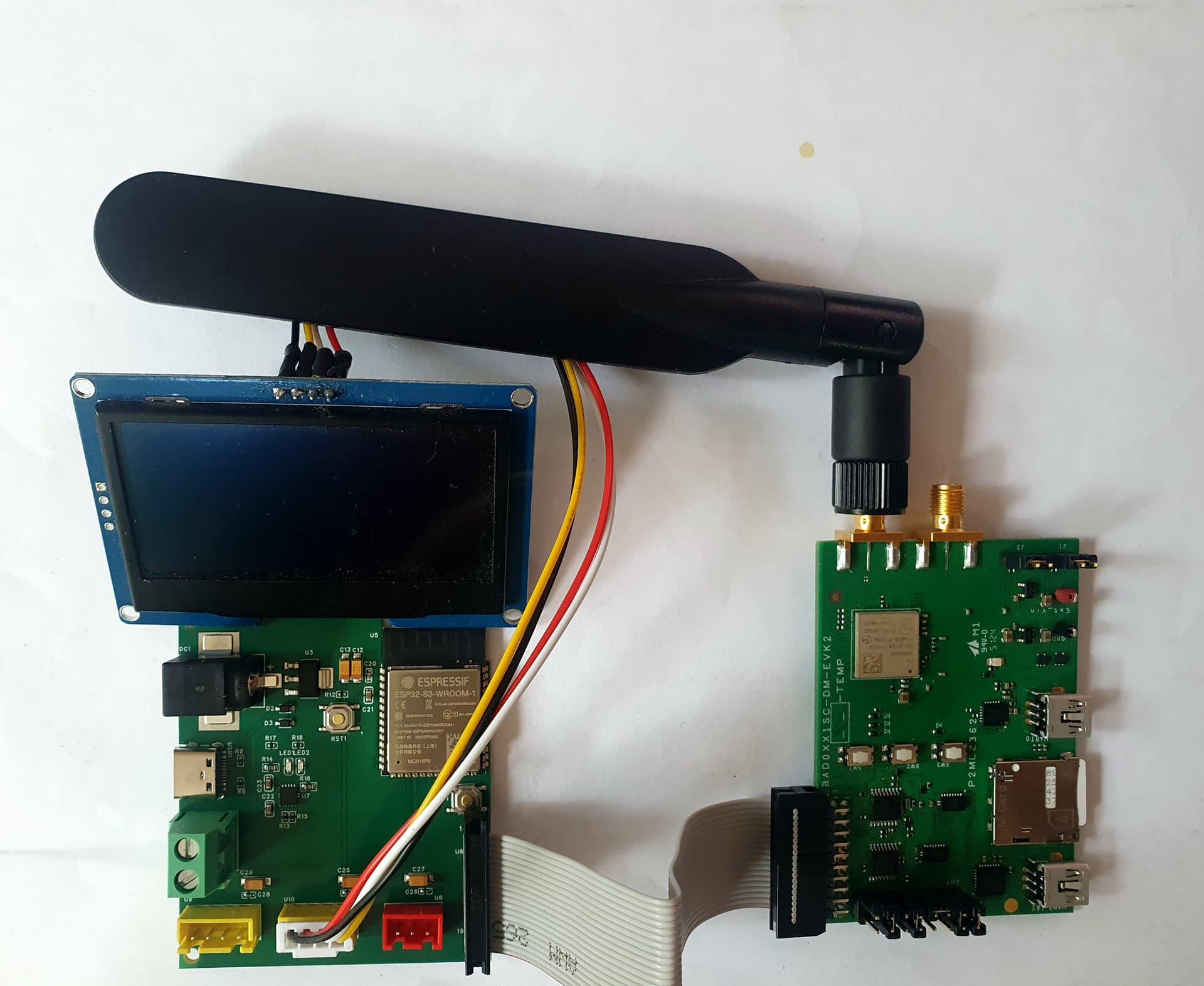
For the Murata 1SC EVK, I’ve quickly developed an ESP32 adapter board, battery operated together with a charger. With a ribbon connector to the STMod+ of the EVK
When interested, let me know.
All,
For the Murata 1SC EVK, I’ve quickly developed an ESP32 adapter board, battery operated together with a charger. With a ribbon connector to the STMod+ of the EVK
When interested, let me know.
Love it! I’m interested in such a board also, if you happen to have boards you need to get rid of 
ESP32 board attached to the 1SC NTN with 2* I2C for Sensor and OLED and 1* UART for GNSS
I got the connection to Skylo to less than 1 minute!
I can now program the right demonstrator and box it
Hello Bart,
It sounds really nice, please keep us posted.
When you say less then 1 minute, can you share the AT command list please?
I am trying to replicate the instructions but never had connection with the skylo…
Where did you got the information about the pins available on the boards?
I am looking for the schematic for 1SC but didn’t had luck while search it, can you share?
Hi Tim,
Zack here with the Monogoto support team. Do you have the ICCID you are having issue with?
If you email support@monogoto.io our team will be happy to help you.
Best,
Zack
Hi Tim, I’ve added a connection video with Skylo and the EVK on intelisense.eu. Have a look. You can see the command list as well.
Bart
Hello Bart,
Thanks for the fast reply!
Have already check the video will try it tomorrow and let you know the results.
Did you manage to use the GNSS for the position as you introduce it manually?
And about the iSIM have you try it?
Can you share the schematic of the 1SC EVK?
Thanks for yout help.
Best,
Tim
Will reply tomorrow Tim
Bart
My Feedback & Answers Regarding NTN, GNSS, ISIM, and the 1SC EVK
Hello Tim,
Let me start by answering your questions and adding a few tips. I’ll be honest: some of my feedback isn’t very positive—but I’ll start with a positive note about the NTN, even though implementation has been challenging.
1. GNSS for Position
You asked if I managed to use GNSS for positioning when entering it manually.
The position from the 1SC is not GNSS-based and can take an extremely long time to acquire, delaying the NTN connection setup. To address this, I added a GPS connection to my add-on board and entered the position manually.
2. ISIM Usage
I didn’t receive the ISIM version—and in hindsight, I’m glad. Using ISIM results in a vendor lock-in. From my understanding, the ISIM cannot be replaced, meaning you can’t switch providers. Currently, my prospects are unwilling to work with a provider based in Israel.
3. Schematic of the 1SC EVK
Unfortunately, I cannot share it. This is not personal, but Murata’s restrictions are strict. When I first contacted them, I had to sign an NDA before they would even discuss the 1SC.
Once signed, I still had no further contact. Purchasing the EVK provides a secret passcode (e.g., “Murata01  ”) to register on MyMurata, where you can download 1SC and EVK documents. Before downloading, you must agree not to share them. Some PDFs are even watermarked with your (company) name and protected against copying—making it impossible to copy AT commands directly.
4. EVK Design Issues
The EVK seems poorly aligned with standard practices. For example, the STMOD+ header (CN7) pin numbering is completely different from a standard IDC connector. If you design an external board using their table, you’ll run into serious problems after production and am screwed.
5. Relevance of the EVK
I’ve never understood the need for an evaluation board here. These modems are for IoT applications in the field—especially NTN, which requires clear skies—not desktop setups with virtual COM ports.
That’s why I created an adapter board with an MCU. My first prototype used the ESP32-S3 for many reasons. With my C++ application, the modem consistently crashed at the same AT command. Murata’s technical support blamed my design and offered unhelpful advice.
I then rewrote the same script in MicroPython on the ESP32—and it ran perfectly.
6. Overall Impression
For me, the EVK is outdated, unsupported, and ultimately useless.
7. Tip on Libraries
There’s a Korean company that created a nice LTE-M library for the previous version of the 1SC modem. This could be great—if LTE-M is supported by Monogoto. However, if ISIM is enforced, LTE-M may not be usable, which would make the 1SC far less attractive for the market.
Hello Bart,
Thanks for your good reply!
Have been trying to replicate the skylo connection basically coping your AT commands from the video but not having much luck.
Best regards,
Tim
@laurens Can you share the information about iSIM that you used in your video on doc.monogoto?
Also can you send the list of commands used because when try to replicate it some where cutted and could not read it properly.
Thanks.
Best regards,
Tim
Hi Tim,
If you send me an email, I will respond with the info you are looking for
Bart
Hi @Tim,
I’ve been using this tutorial, and implemented all AT Commands step-by-step.
Hello Laurens,
Thanks for the reply, have already been using those commands and now it register on skylo but haven’t send data as it is not working well.
The other subject that you mention on the video and also is possible to see that you are not using the sim on the board, can you explain how did you achive that?
Thanks.
Tim
Hi @Tim,
Below the part I to set it to the internal or external SIM. But, before you can use it, it needs to be activated and linked to your Monogoto account.
Run the following command to get the ICCID of the iSIM, and check in your Monogoto Hub if this iSIM is linked to your account. If it isn’t, you either need to use the external SIM, or you need to get in touch with the Monogoto team (support@monogoto.io) so they can connect it to your account.
AT%CCID
Link to internal/external SIM
Check the SIM initialization selection policy is currently using:
AT%GETCFG="SIM_INIT_SELECT_POLICY"
Expected response:
SIM_INIT_SELECT_POLICY:5. The last digit indicates the Active SIM: 0 indicates External (SIM card) 5 indicates Internal (iSIM)
Enable the External SIM card
AT%SETCFG="SIM_INIT_SELECT_POLICY","0"
good morning Laurens,
Thanks for the reply, but when I leastening the video is not what it sounds…
By the way everytime we change the sim policy form 0 to 5 or the other way we need to reboot the module to assume the command.
But when it is in policy 5 internal SIM i keep getting ERROR for the command AT%CCID
How do you get the iSIM CCID?
Thanks.
Best regards,
Tim
Hi Tim,
Sorry, it’s hard to debug this issue based on your message. I would think that the iSIM is not activated or linked to any operator.
If the plastic SIM works, I’d suggest to go with that option. Otherwise, directly connect with our support team: support@monogoto.io
Good luck!